12 March 2024
Looker: Understanding the building blocks
Following our introductory post on data modelling to help answer the all-important 'why' questions about your business, we explore the building blocks of Looker and help guide how to arrange these into a structure that will grow with you
Following our introductory post on data modelling to help answer the all-important 'why' questions about your business performance, this post will explore the building blocks of Looker and help guide how to arrange these into a structure that will grow with your business.
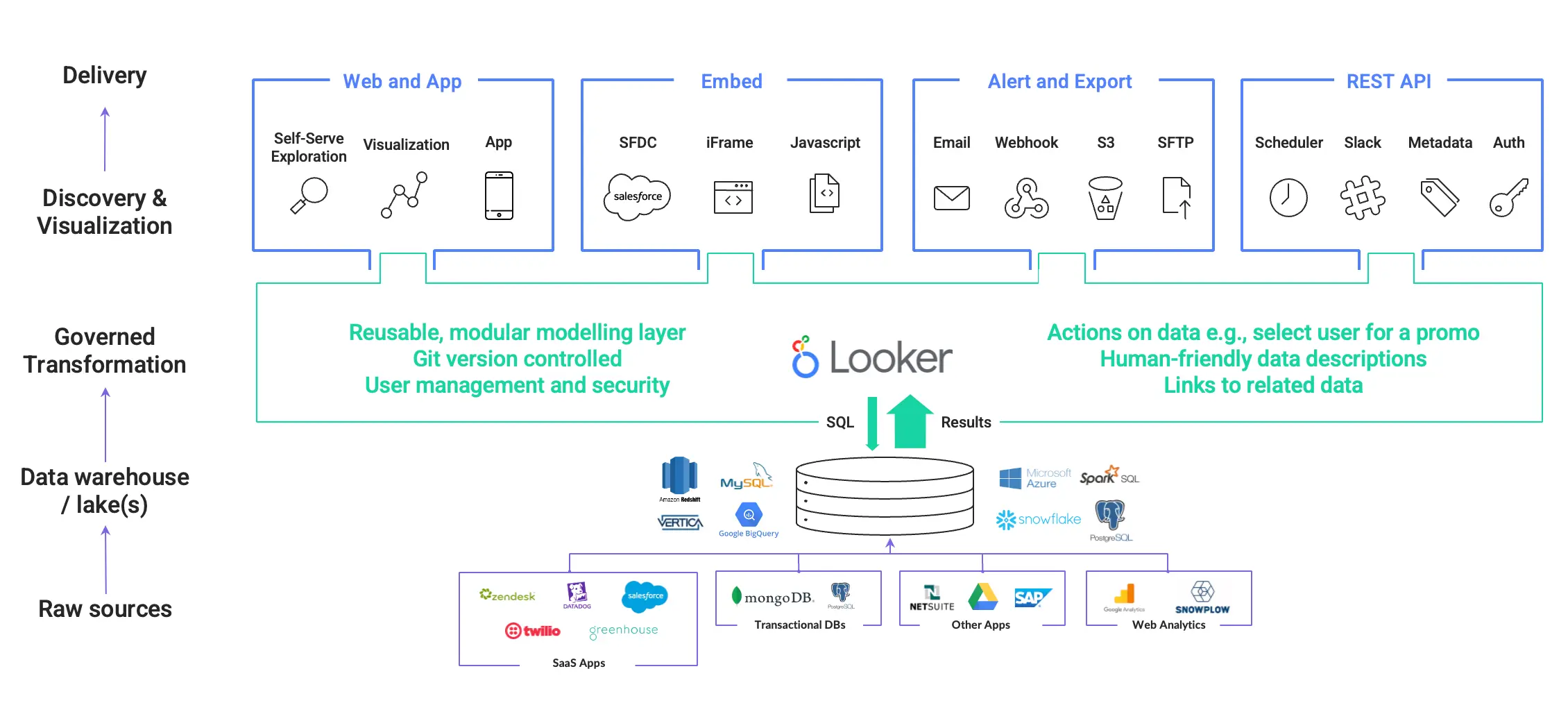
For anyone who hasn't used the tool, Looker was founded in 2012 and brought a fresh approach to data modelling, introducing a proprietary LookML (Looker Modelling Language) and a back-end system doing the heavy lifting of composing LookML into SQL to be issued against the database. The company grew rapidly as it addressed many of the painpoints in data teams' activities, leveraging the new massively parallel processing databases like Redshift and BigQuery. Looker improved access to and actionability of data, allowing "write once, reuse many times" development of queries and a drag-and-drop interface for data consumers. It integrates with downstream systems like Slack for communications, Facebook and Google Ads, email and SMS tools for marketing activation, Zapier or custom workflows to unlock a broad range of actions, in addition to the table-stakes dashboards, embedding and access management from other business intelligence tools. The company was acquired by Google in 2016 and gradually integrated alongside Looker Studio (Formerly Google Data Studio) as the upper tier of their business intelligence offerings. Looker remains a great choice for businesses today, but is not a silver bullet that can solve all problems.
The flexibility and feature set of Looker brings with it a challenging aspect - given that it can do many things, it is easy for an ill-considered setup to become an unmanageable web of definitions that is difficult to change when the need arises. The tool works with many databases, but lacks features on some dialects that make the fundamental assumptions underpinning Looker's design start to break down as your business scales. Other data modelling frameworks can perform certain tasks better, particularly when dealing with large volumes of data. As a result of these challenges, setting up and maintaining a clean project structure from the beginning is important.
Before discussing what a best practice structure looks like, we need to understand the building blocks within the Looker system and how they relate to concepts outside it.
LookML
Projects
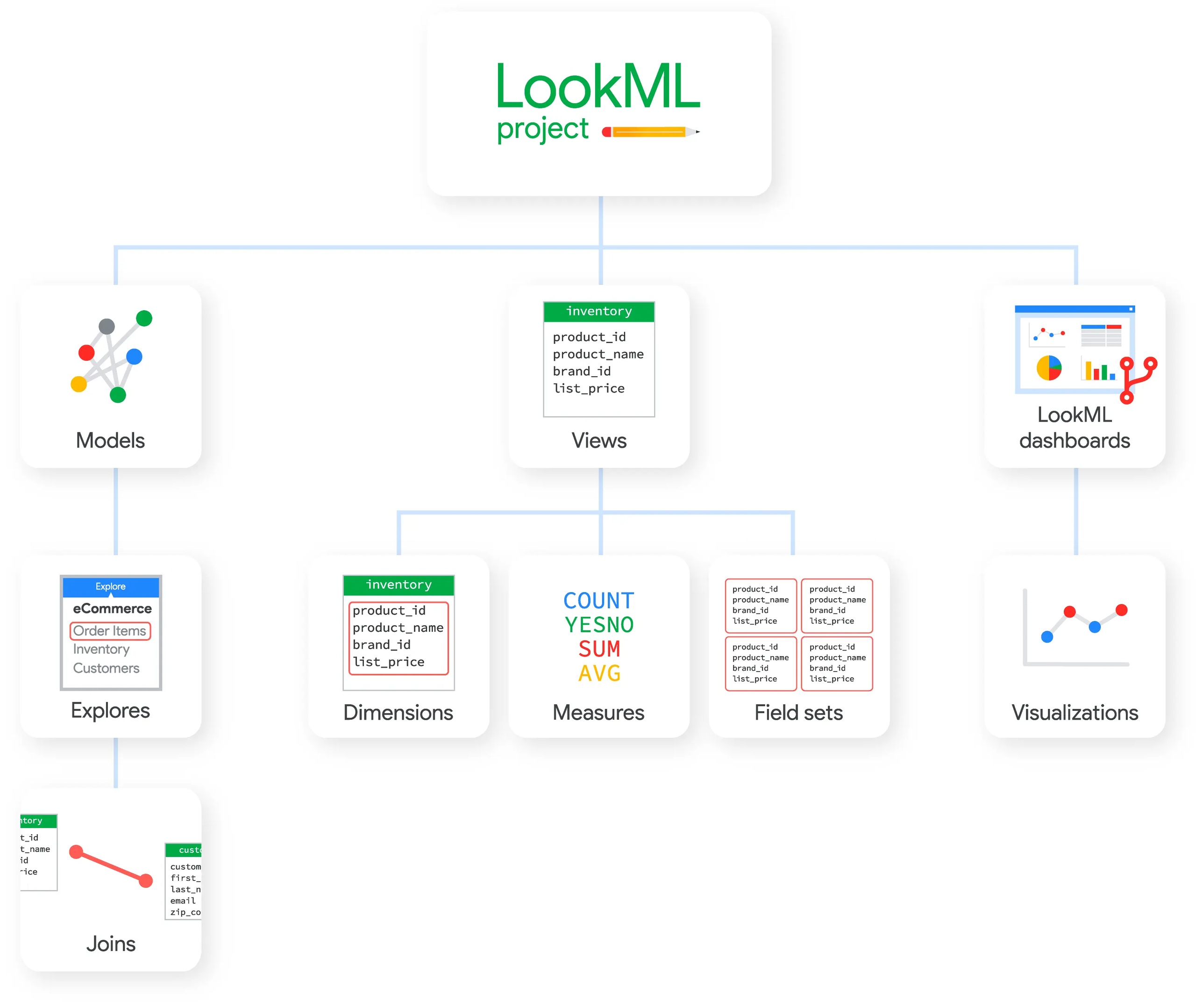
A LookML project is a collection of files including at least model and view files, that are typically version-controlled together through a Git repository. Projects can be allowed to connect to one or more data warehouses/lakes, define storage location for LookML files, and overall development configurations.
The model files contain information about which tables the project will use and how the tables should be joined. The view files describe how information is calculated about each table (or across multiple tables if the joins permit this). Projects may also contain other file types that help to deliver content to users, such as geospatial references or other custom data, localisation configuration, readme files, custom visualisations, custom javascript applications, and other supporting files.
When an end user asks a question of the data, Looker translates the question using the semantic model defined within the project and generates SQL that can be run against the underlying database. LookML separates structure from content, so the query structure (how tables are joined) is independent of the query content (the columns to access, derived fields, aggregate functions to compute, and filtering expressions to apply).
Models
A LookML model is a top-level .model.lkml file within the project. The model name is taken from the file name and must be unique through the Looker instance. A model can be tied to one and only one database connection. Looker uses this configuration to know how to translate the join and aggregation logic written in the LookML files into SQL for the relevant database (given that, for example, Redshift SQL is not 100% compatible with MySQL).
Models can be thought of as a collection of entry points to your underlying business data, for a selection of users. They contain configurations specifying the database connection and one or more Explores, plus global configurations like localization, mapping and permissions grants. This is the core element on which you allocate permissions to view, edit or update data definitions in Looker.
Explores
A LookML explore is (often, but not always) a standalone .explore.lkml file within the project, with a top level explore: object. The explore name is defined within the file content, along with a range of parameters to configure Looker's behaviour when surfacing the content to users.
The explore has two main purposes - one, it defines how tables/views join each other so that the appropriate SQL can be generated, and two, it defines how users are presented with a starting point for creating their own queries. As a loose analogy, this defines the FROM and JOIN clauses that are written into SQL. Note that there is commonly confusion between this and an Explore, which is the interactive page which end users consume. Being careful in your terminology from launch will help users.
Views
A LookML view is (often, but not always) a .view.lkml file within the project. It contains a definition of the data source, dimensions (things that are grouped by) and measures (things that are aggregated), along with a range of parameters to configure the behaviour and presentation of the data when it is added to a query. These can include actions that a user can take on the data, such as sending an email to a customer.
View files can point to underlying database tables, LookML explores or custom SQL written against the underlying database, allowing nesting and reusability of the concepts defined within the view. As a loose analogy a view is an abstraction of a table, a materialised view or CTE in SQL, but has added features native to the Looker system.
When Looker writes SQL, it follows the following general format.
SELECT
<dimension>, <dimension>, ...
<measure>, <measure>, ...
FROM <explore>
LEFT JOIN <view> ON ...
LEFT JOIN <view> ON ...
WHERE (<dimension_filter_expression>) AND (<dimension_filter_expression>) AND ...
GROUP BY <dimension>, <dimension>, <dimension>, ...
HAVING <measure_filter_expression> AND <measure_filter_expression> AND ...
ORDER BY <dimension> | <measure>
LIMIT <limit>
Explores, views, dimensions and measures we've talked about above. Filters and limits can be applied across either a view or explore, depending on the specific implementation being used.
Access controls
Looker has a flexible access control system, with components that sit within the LookML files described above, the Looker instance administration and underlying database configuration. On initial exposure it can be hard to conceptualise what configuration will work best for your situation, but again we need to understand the building blocks within the Looker system and how they relate to concepts outside it.
Users, user attributes and groups
Users in Looker are straightforward, but become more interesting from an access control perspective when combined with attributes and groups. Managing permissions on a per-user basis is typically a poor design choice, so defaulting to using groups (even if for 1-2 members initially) is the right approach.
User attributes can be leveraged to allow Looker to access user-specific git or database credentials, allowing for customization of permissions on both the underlying data and the data models.
Roles, model sets, and permission sets
Roles are a combination of models defining content and permissions specifying what actions can be taken on that content. Given that models are not only the interfaces that are exposed to data consumers, but also the data definitions and database access contained in the LookML files making up the model, this is the functionality through which strict access controls should be managed.
Looker implementations will typically have a close correlation between roles and organisational hierarchy, then a loose mapping of models to functional teams. For example, this could mean a digital marketing analyst has access to the marketing model set, is allowed to view visualisations referencing these models, but cannot edit the LookML files that define it.
Access grants
Access grants are permissions that can be attached to a LookML object (usually a field, view or explore). These do not provide any control over the data definitions, but allow for fine grained row and column access control on the underlying data for users consuming the data. Loose or user-specific access controls can be managed in this layer, in combination with user attributes.
Content access
Content access controls where visualisations can be saved and by whom, as well as whether the specific visualisation is viewable by others. Note that content access will not prevent a user recreating the visualisations in a folder they have access to and retrieving the data, if their role allows it. This is similar in spirit to allowing access to your Google Drive or Sharepoint folders. Files are protected by default but if they are downloaded and emailed to the recipient, the access controls are lost.
Bringing it all together
Taken in combination, roles, content access and access grants all form part of the access control system within Looker, enabling you to manage internal or external users permissions on the data model definition, the underlying data, the visualisations created on top of the models, or the actions that users can take after consuming the data. Getting the foundations set up right is important if you want to realise the self-service data future promised by the Looker platform
Looker can be adopted by small businesses or large enterprises, where data activities are centralised or decentralised and anywhere in between. This flexibility shows through in its features, but comes with a learning curve and maintainability challenges. Starting out with a project and access control template that aligns with where your organisation sits on this size/centralisation matrix can be helpful - and this is what we'll follow up with in our next post.
FAQ
How does Looker handle complex data transformations?
Looker's view files can contain transformations in raw SQL, or it can derive SQL from an explore made up by any number of view files. For maintainability and readability it is important to start out with a view of what the capabilities of both your users and your database are. While Looker can theoretically support highly complex data transformations, in practice and if unchecked it can become highly inefficient and unmanageable.
Does Looker have the ability to define data quality checks?
Looker has a catch-all `.lkml` file type which can is used for a range of content beyond the primary building blocks above. It is common to define tests in these files, each referencing a source explore and defining an expected result from running an Explore or query. Tests can be run on demand while developing LookML, or as part of the CI/CD process for a project.
What are some best practices for version control and collaboration when working with LookML files?
We'll cover recommendations and best practices in our next post on this topic. Integration with Git is strongly recommended, and the standard git branching and naming conventions are helpful hygiene.