4 September 2024
MDS in a box
For SME and startups, anything that allows you to spend more time creating value and less time on 'busy work' is helpful. We've put together a sample "Modern Data Stack" in a box to prototype from data to pipeline to analysis rapidly and at low cost
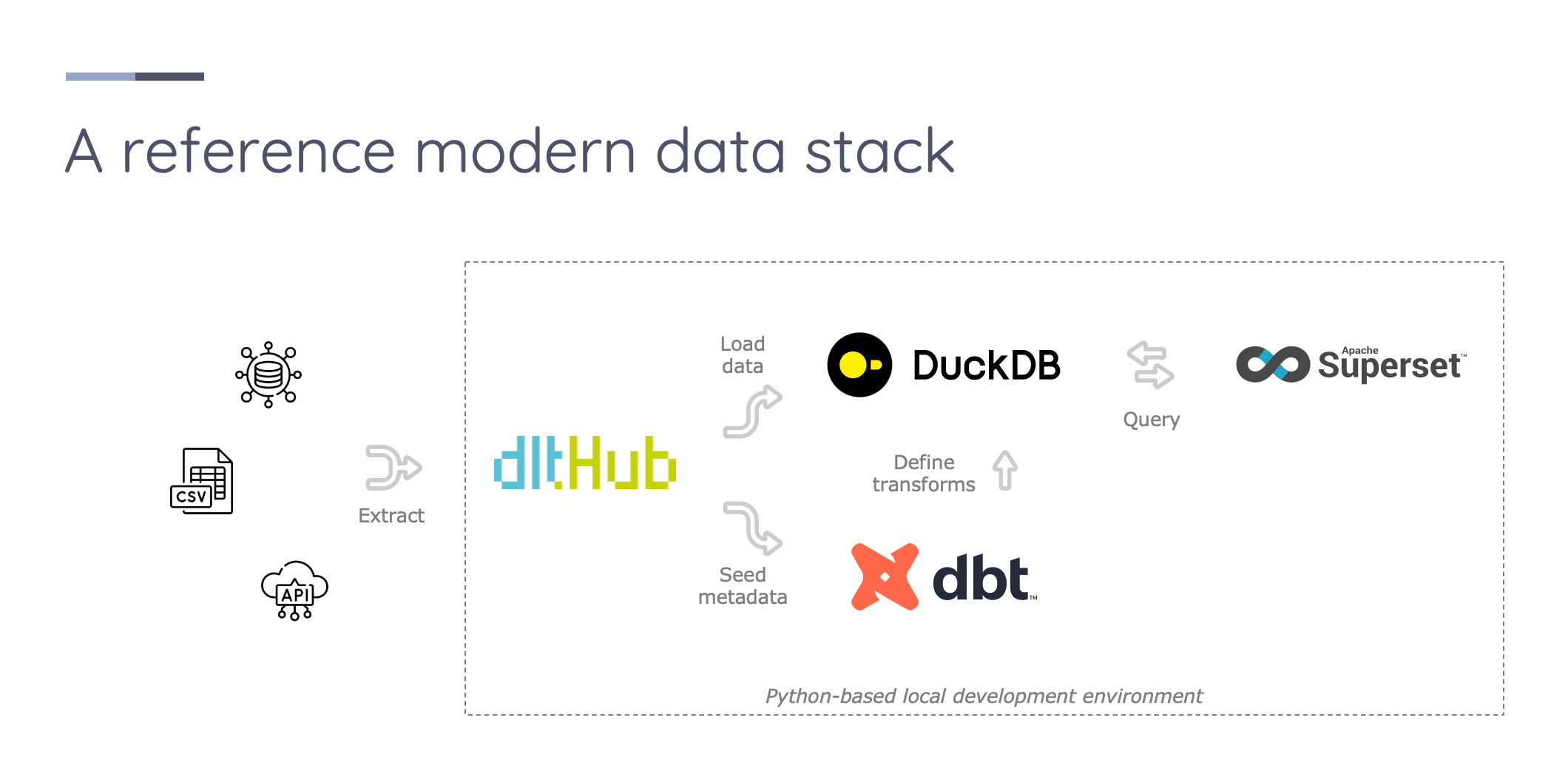
The "Modern Data Stack" is one of those Unspeak terms - a somewhat loaded statement which implies much without really defining what it is and how it might differ from the Prehistoric-, Historic-, and Postmodern-Data Stacks, should they be deemed to exist. For now, let's set aside the rabbit hole of where the boundaries lie, let alone if the categorisation is actually helpful, and align to a generally accepted community definition. Consensus seems to coalesce around an interpretation that it includes:
- Facilitation of end-to-end data flows from ingestion to storage, analytics and metadata management
- Modular components that maximise interoperability
- Open-source or open-core offerings that minimise platform lock in
- SQL-first transformations
From our perspective serving the SME and startup sectors, anything that can help our clients to spend more time creating value and less time on 'busy work' is valuable. We've spent countless hours setting up new tooling, configuring environments and so on before even getting close to analysing data. It is this low value, repeatable setup work that we want to address with this post. By the end of it you can walk away with a series of steps in a sample set of tools that might save you hours of manual setup moving forward.
Let's assume that you are a data practitioner (Engineer, analyst, scientist or anywhere in between) working to connect to a new data source, load its output into an analytical data store, model it and then conduct some exploratory analysis. To do so, you need tools that can cover these steps in the data lifecycle, and integrations between them that are as smooth and preferably automated. There are three broad categories of setup that allow for this end-to-end experience.
- All in one SaaS tools like Domo or Zoho Analytics
- An enterprise level data platform from a combination of SaaS, self-built and open-source components
- A custom development environment using open-source tools
If you are a working data professional, your employer might provide tools that cover certain steps in the process, but it is unusual to find SMEs and startups where the full end to end experience is covered. If you are a hobbyist working on personal projects, these options are often unavailable, uneconomic, or have high setup effort.
In our approach we squarely focus on easing the setup of a custom development environment for technical-minded data practitioners. Building on open-source tools means that the solution(s) are applicable across companies, reduce barriers to entry and that you can extend the solutions with the help of the various open-source communities. We also minimise dependencies to facilitate local setup on a laptop through to on-premises or cloud-based deployment should the need arise.
A modern data stack for (local) development
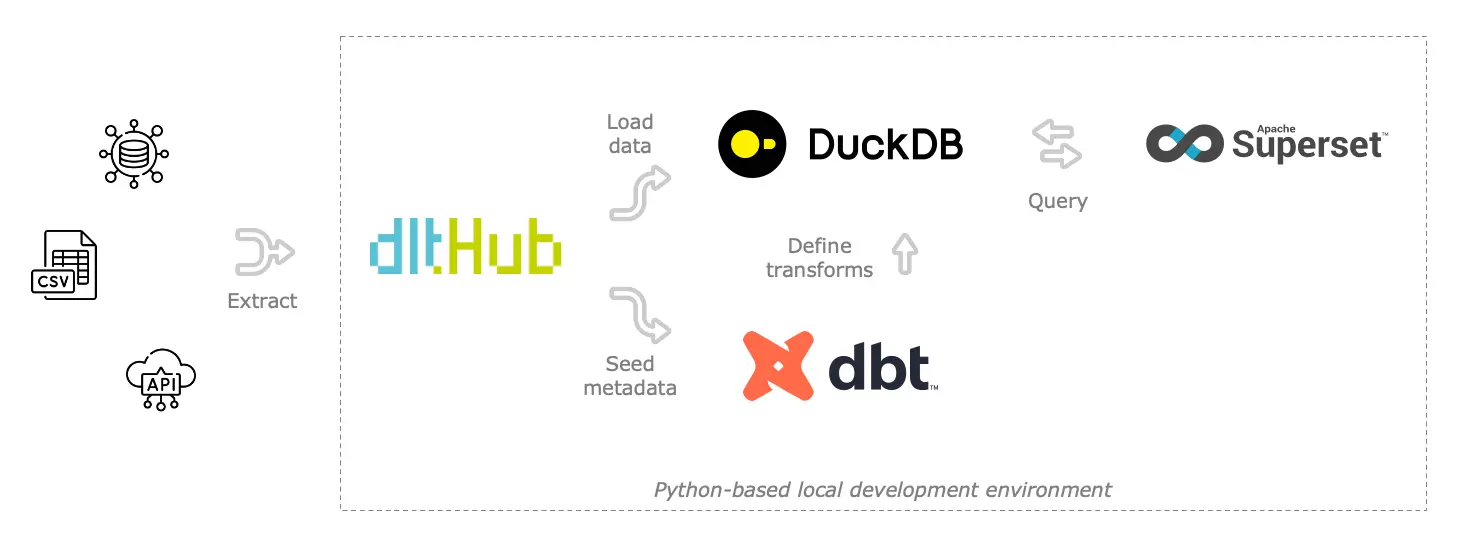
Our selected MDS is as follows:
-
Utilities:
- Virtualenv as the common python virtual environment manager
- Invoke as a python-native build tool (like grunt or gulp for javascript) to automate repeated setup steps
-
data load tool as a framework for extracting data from APIs, databases and files, normalising it and loading to an analytical data store
-
DuckDB as a fast in-memory / local / remote database
-
data build tool as a framework for modelling the saved data and creating views that can be analysed in a visualisation tool
-
Superset as a basic data access layer, with its SQL client, basic metrics layer and visualisation support
These tools have been chosen given their wide availability and coverage of the end-to-end flow. All are available with a simple pip install and do not require containerisation. Note that in making these selections we also make simplifications to solve for the most common situations. We assume the data you are interested in isn't highly sensitive and secured with multiple infrastructure layers, is small enough to be processed by a single machine, and custom libraries are either not required or have package version flexibility that means virtual environment segregation is not critical. To integrate these tools together, we build some simple scripts to facilitate metadata transfer between stages.
The stack is sufficient for basic development and extendable to include other open-source projects, such as Great Expectations for data quality tests and a variety of orchestration tools like Airflow, Dagster or Github Actions.
Getting started
Clone the repository from our Github here, navigate to the root of the repository in your terminal and follow the setup instructions below
python3 -m venv .venv
source .venv/bin/activate

pip install invoke python-dotenv

invoke setup-all
Invoke can then run a series of commands to install required packages into the virtual environment. Once installed, you can get started using the sample data in the repository. Invoke has been configured with commands to:
invoke setup-allwill run a pip install of the various requirements, set up a local duckdb instance, initialise superset with a default set of credentials and setup a scratch dbt project (this last step is irrelevant for this pre-populated git repo, but can be helpful for templating future dbt model setups)invoke run-pipelineswill pull data from sample files in the repository and load them into duckdb, then populate your dbt staging model directory with various .sql and .yml files as a starting point for a build, then start a Streamlit app to view the loaded data.invoke build-modelswill check connection, seed any local data, compile and build these models to make them available for you to queryinvoke run-supersetwill start a local instance of Superset to visualise and explore the data you have loaded
That's all there is to get started!
data load to build tool integration
One of the features of data load tool is its prioritisation of metadata and packaging alongside the underlying table data. We take advantage of this by adding a dbt model generator.
import dlt
from dbt_model_generator import DbtModelGenerator

pipeline = dlt.pipeline()

load_info = pipeline.run(data())  # where data() is your @dlt.source() decorated function returning resources that yield data from an origin

dbt = DbtModelGenerator(
    dbt_staging_dir=os.environ.get('DBT_STAGING_DIR'),
    source_name=pipeline.dataset_name,
    config_file=f"./{os.environ.get('DLT_PROJECT_DIR')}/config.yml"
)

dbt.generate_models(load_info=load_info)
The dbt model generator will do the following:
-
Read in a config file defining a range of default run parameters (e.g., ignored tables, column aliasing, transforms)
-
Extract the latest tables and schema from the dlt pipeline run, including any supplied table and column descriptions, if present
-
Check for breaking changes between old and new staging versions, creating backups of old SQL and yml files if needed, using a
<filename>_YYYYMMDD_hhmmss.<sql/yml>.bkupnaming convention -
Create or update schema for staging tables + models including
- Column and table descriptions if present
- Basic test information (primary keys, not null columns)
Using this approach allows us to pass through, for example, comments from an underlying Postgres table (COMMENT ON COLUMN my_table.my_column IS 'Employee ID number';) and have them show up in dbt models after the data has landed in a warehouse, streamlining and reducing documentation efforts.
Customising for your needs
The repository has been loaded with some sample demographics data from the UN and World Bank for demonstration purposes. Internally, we extended it with further pipelines extracting 2024 Olympics data and ran some interesting analysis on medal-winning efficiency between countries.
If this has inspired you to modify it for your own purposes, you'll need to focus in the following areas:
- To ingest new data: Adding new sources is straightforward by following examples from dlt docs. Modify the data load tool pipelines (defined in
./dlt_pipelines/path/to/file.py), then run the pipeline(s) or source(s) usingpython ./dlt_pipelines/path/to/file.pyfrom the project root. When you're happy with the config, update the invoke tasks file./tasks.pywith the relevant command(s) - To view the ingested data: Run
dlt pipeline <name of pipeline> show. This will start up a local server where you can confirm that the new pipelines have loaded data in the way you expect. - To model the data that you have ingested: To auto-create dbt staging models from your new dlt pipelines, be sure to add the
DbtModelGenerator.generate_models()call after your new pipeline run. Create your own intermediate and final model files in./dbt_models/models/path/to/file.sqlwith the relevant content, then run native commands e.g.,dbt compileor the end to endinvoke build-modelsto verify the output - To auto-run the dbt models as part of a dlt pipeline, you can also utilise the dbt runner to execute the dbt build after dlt extract-load completion.
Caveats
This is a proof-of-concept modern data stack which won't be suitable for all applications but aims to minimise effort for most situations. It is not intended for direct integration into existing production deployments so your mileage may vary in these setups. Note that development mode in data load tool is on by default, which will load data to timestamp-suffixed schemas to isolate them from production data. These are not cleaned automatically so you will need to periodically remove if using this mds-in-a-box for long running projects to prevent database size getting out of control.
Next steps
There are many directions to take this MDS in a box project - from packaged dbt data models for common data sources, extensions to handle schema evolution, quality checks and metadata. Let us know if you are interested in any of these and we're happy to share our thoughts.